Summary
The product gallery is one of the most underused conversion surfaces in ecommerce. It occupies some of the most valuable space on the product detail page and is often one of the first places customers turn when they begin evaluating a product. Yet many galleries are still designed primarily as collections of photography, with a hero image, several alternate angles, a lifestyle shot, and perhaps a video.
That approach leaves a great deal of commercial value on the table. Customers shopping online cannot pick up a product, turn it around, feel its materials, see how large it is, ask someone a question, or compare two options side by side. The product page has to help replace those experiences, and the gallery is particularly well positioned to do that because it can communicate a large amount of information visually without requiring the customer to work through the entire page.
The Modern Product Gallery framework treats the gallery as a commerce engine rather than a photography carousel. It organizes the gallery around four jobs, Show It, Explain It, Prove It, and Help Them Buy. Within those four jobs are 16 questions that product imagery and other gallery assets can help answer as someone moves from seeing a product to deciding whether to buy it.¹
The framework has been shaped through ecommerce, product-page, campaign, and digital experience work across client websites. It builds on the broader NewBrains approach of treating the website as part of the buying experience and using product galleries, product content, proof, and other website surfaces to help people move from interest toward a decision.²
Not every product needs 16 individual gallery images. A video, comparison graphic, customer image, or annotated photograph may answer several questions at once. The standard is that the team building the product page has considered all 16 jobs and decided how the gallery should help the customer with each one.
Need help turning your website into a growth engine? Let’s Talk
Why the product gallery matters for conversion
Product detail pages carry much of the burden of helping someone decide whether a product is worth buying. In physical retail, customers can examine an item from different angles, judge its scale, inspect the material, try it on or use it, compare it with another product, and sometimes ask someone for help. Ecommerce has to reproduce enough of that information through content for the customer to make a confident decision without having the product in front of them.
Research supports how important visual product information has become to that process. Salsify’s 2025 consumer research, based on 1,910 shoppers in the United States and United Kingdom, found that 77% considered product images and videos very or extremely important when deciding whether to complete a purchase. The same percentage said this about product titles and descriptions, while 71% said ratings, reviews, and user-generated content were very or extremely important.³
The gallery also receives attention early in the product-page experience. Baymard Institute found in product-page usability testing that 56% of participants began exploring product images as their first action after arriving on a product page.⁴ That does not mean customers never scroll, but it does show that the gallery is receiving attention at the point when someone is beginning to understand the product and decide whether it deserves further consideration.
This matters because the gallery usually occupies a significant amount of the space visible when someone first arrives, particularly on mobile where product imagery can dominate the first part of the experience. If those images only show the product from slightly different angles, the brand is using valuable product-page space to repeat information when it could also be explaining the product, demonstrating its value, answering questions, and reducing uncertainty. The rest of the product page still has an important role, but the gallery can contribute much more to conversion than simply being the place where product photography lives.
Ecommerce is becoming part of a more visual web
The way people use images outside ecommerce websites is also changing. Images have traditionally supported information on the web, while search and navigation have largely depended on words, links, and menus. Visual search is beginning to give images a more active role in how people discover and investigate products.
Google Lens is used for nearly 20 billion visual searches each month, and Google says approximately 20% of Lens searches are shopping-related. A shopper can photograph something they encounter in the physical world, select an item appearing on a screen, or use an image to find product matches, reviews, prices, similar products, and places to buy.⁵
This is part of a broader change in what visual information can do online. An image can increasingly become the starting point for identification, search, comparison, research, and purchase rather than simply something a person looks at after arriving on a page. Product galleries can reflect the same principle by combining photography with annotations, demonstrations, customer content, comparisons, video, benefits, and other forms of visual communication that help customers understand more about what they are considering.
For ecommerce teams, this changes the question from how many photographs a PDP needs to what customers need to understand before they are ready to buy.
What is a commerce-engine product gallery?
A commerce-engine product gallery is planned around the questions customers need answered when evaluating a product. The starting point is not simply the photography available in the asset library, but the buying decision the gallery needs to support.
For a running shoe, customers may want to understand how the shoe looks from different angles, what it looks like when worn, the type of activity it is designed for, how the cushioning is constructed, whether the materials are breathable, what other customers think of it, and how it differs from another shoe in the range. A skincare customer may need different information, such as texture, application, ingredients, routine placement, expected outcomes, and supporting proof. Furniture may require dimensions, room context, material detail, storage or functionality, configurations, and views that establish physical scale.
The Modern Product Gallery framework groups those questions into four larger jobs that remain useful across categories. The customer first needs to see the product properly, then understand why it may be relevant, find enough evidence to believe what is being claimed, and resolve the remaining questions that affect whether this is the product they want to buy.¹
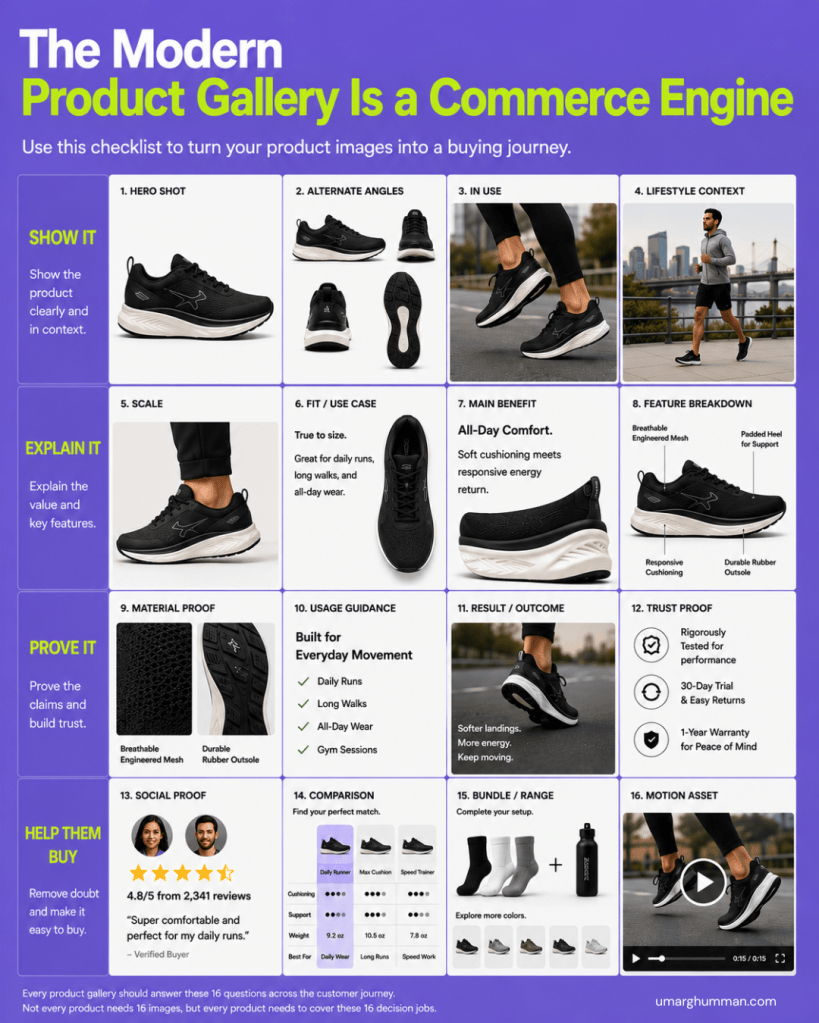
The 16 jobs within the framework do not prescribe a fixed number of assets. They give ecommerce and creative teams a way to think through what the customer may need from the gallery before deciding what photography, graphics, video, customer content, or other assets should be produced.
1. Show It: help customers see the product properly
The first four jobs cover the most familiar role of product imagery, but even here the gallery should be planned around what the customer needs to learn rather than simply how many photographs the creative team has produced.
The hero shot should make the product immediately clear. Depending on the category, that may mean showing the complete product on a clean background, presenting the packaging alongside the product, or using another view that gives customers a clear first understanding of what is being sold. The image can still express the brand visually, but clarity becomes particularly important when it is the first piece of product information someone encounters.
Alternate angles allow the customer to inspect what they cannot physically turn around. The useful angles will vary by product. A shoe might require the side, top, back, sole, and relevant construction details, while a piece of furniture may need front, side, back, open, closed, and interior views. Nielsen Norman Group’s ecommerce research identifies alternate views, product context, detail imagery, measurements, and other visual information as important parts of helping customers answer product questions online.⁶
An in-use image should show how the product actually behaves when someone interacts with it. Footwear can be shown being worn during the activity it was designed for, cookware while preparing food, a beauty product during application, or a suitcase while being packed. The value comes from answering questions about use that a studio photograph cannot easily answer.
Lifestyle context gives the product a wider setting and helps customers understand where it belongs. A running shoe shown on a runner during an everyday city run communicates something different from the same shoe isolated against white. The lifestyle image can help establish occasion, environment, customer, and the role the product is intended to play without requiring all of that information to be explained separately in copy.
2. Explain It: use the gallery to communicate product information
Once customers can see the product properly, the gallery can begin helping them understand why it might be right for them. This is where ecommerce galleries often have much more room to improve because information that could be communicated visually is frequently left to descriptions, specifications, accordions, or content much farther down the page.
Scale is one example. Dimensions are useful, but numbers still require a customer to imagine what those dimensions mean in the real world. Showing a bag being carried, furniture inside a room, a bottle in someone’s hand, or another familiar reference can make the size of a product easier to understand immediately.
The fit or use case should help customers understand who the product is for and when they would use it. In the running-shoe example, that could mean explaining visually that a particular shoe is designed for daily running, walking, or all-day wear. For a supplement, it could clarify the health goal or routine it supports, while luggage might show how much can realistically be packed for a particular type of trip.
The main benefit gives the most important reason to consider the product greater visibility. Product pages often contain a long list of features and benefits, but not all of them carry equal weight in the buying decision. A gallery asset can establish the main proposition quickly, then use the product itself to help explain why that benefit is relevant.
A feature breakdown can take the explanation further by pointing directly to the parts of the product that matter. Annotations can identify cushioning, materials, pockets, controls, ingredients, components, construction, or other characteristics and connect them with their purpose. Salsify’s 2025 research found that 54% of shoppers considered enhanced product content such as comparison charts and feature tours very or extremely important when deciding whether to complete a purchase.³
The advantage of communicating some of this information in the gallery is that the product and the explanation can appear together, allowing someone to see the feature while learning why it matters.
3. Prove It: give customers reasons to believe the claims
As product pages move from explanation into persuasion, the quality of the evidence becomes more important. Brands can describe almost any product as comfortable, durable, effective, premium, high-performance, or easy to use, but customers still need enough information to decide whether those claims are credible.
Material proof makes relevant product qualities visible where possible. A close-up of engineered mesh can help support a claim about breathability, while a detailed image of a sole can show its construction and tread. Beauty brands can show texture and consistency, furniture brands can provide close views of materials and finishes, and apparel brands can bring fabric, stitching, and construction closer to what someone would examine in a store.
Usage guidance can address the practical questions that emerge once someone becomes interested. Depending on the category, this may include how much to use, when to use it, how it fits into a routine, how something is assembled or installed, which activities it suits, or how it should be maintained. Some of that information will still require deeper instructions elsewhere on the page, but the gallery can make the most important guidance easier to encounter.
A result or outcome asset helps customers understand what successful use looks like. That could be the finished result of a beauty product, a product performing under realistic conditions, food after preparation, storage being used effectively, or another representation of the benefit the customer is ultimately buying. The appropriate execution depends heavily on the category and what the brand can reasonably support, but the principle is to connect the product with the result it is intended to produce.
Trust proof can bring relevant forms of reassurance closer to the product. Certifications, testing, guarantees, warranties, expert credentials, return policies, awards, or other evidence may be important depending on what customers worry about before purchasing. These signals do not all belong in every gallery, but when they are meaningful to the buying decision, they should not automatically be relegated to the bottom of the page.
4. Help Them Buy: answer the questions that affect the final choice
Customers who understand and believe the product can still have questions before buying. They may want to know what other customers think, whether another version would suit them better, what else belongs with the product, or how it behaves in a way that static imagery cannot demonstrate. The final four gallery jobs are designed around those parts of the decision.
Social proof can bring the experience of other customers into the gallery through ratings, selected reviews, customer photography, creator content, or another useful form of evidence. This is particularly valuable when customers can answer questions that brand photography cannot. A customer image may show how clothing fits on a different body, how furniture looks in a real home, or how a beauty product appears outside the controlled environment of a commercial shoot.
Research from Northwestern University’s Medill Spiegel Research Center found that purchase likelihood increased sharply when products began receiving reviews, with a product displaying five reviews showing 270% greater purchase likelihood than one displaying none.⁷ PowerReviews’ 2024 research also found that 91% of consumers said they were more likely to buy a product when its reviews included customer photos or videos alongside written reviews.⁸ Those findings do not mean the gallery should become a review feed, but they support giving credible customer experience a place within the visual product story when it helps answer an important question.
A comparison asset can help when customers are choosing between similar products rather than deciding whether they need the category at all. A footwear brand might compare a daily trainer, a maximum-cushioning shoe, and a faster running shoe. A skincare brand could distinguish formulas designed for different skin types, while consumer electronics may need to compare specifications or capabilities across several models. When those differences are important to choosing correctly, making customers open multiple PDPs and remember the information themselves creates unnecessary work.
The bundle or range job helps customers understand how the product relates to other available options. That can include complementary items, other colours, related products, systems, routines, collections, or bundles that may make the purchase more useful. The purpose is not to turn every gallery into an upsell placement, but to show relationships that help someone understand what they are buying and what options are available.
A motion asset is useful when movement communicates something that still imagery struggles to explain. A video can show a shoe flexing while someone runs, demonstrate how a piece of equipment operates, show how a suitcase opens and expands, capture the texture and application of a beauty product, or explain how furniture changes configuration. Video belongs in the gallery when it makes the product easier to understand rather than simply adding another media format.
Not every product needs 16 gallery assets
The 16 jobs are a planning framework rather than a requirement to produce exactly 16 separate images for every SKU. The needs of a simple product with very little customer uncertainty will be different from those of a technical, expensive, unfamiliar, or highly considered purchase, and the number of gallery assets should reflect that difference.
Individual assets can also do more than one job. A video showing someone wearing a shoe can communicate scale, demonstrate use, establish lifestyle context, highlight product features, and show how the product moves. A customer photograph might provide both social proof and a better understanding of real-world scale. An annotated photograph may explain the main benefit while also showing the construction that supports it.
The useful discipline is to consider each of the 16 questions while planning the gallery and decide how the customer will get the answer. In some cases the gallery will be the best place. In others, the answer may already be clear through another gallery asset or may belong elsewhere on the product page. The framework is intended to prevent important product questions from being missed simply because they were never part of the photography or content brief.
An example of building the gallery for a running shoe
A conventional running-shoe gallery might begin with a clean product shot, add several angles, include a photograph of someone running, and finish with a video. That gives the customer a reasonable visual understanding of the shoe, but much of the information required to choose it may still be sitting elsewhere on the page.
Using the Modern Product Gallery framework changes the brief. The first group can establish the shoe clearly through the hero shot, alternate views, the shoe being worn, and the environment in which it is designed to be used. The next group can show scale and fit, explain whether the shoe is designed for daily running or another use case, identify its main comfort or performance benefit, and annotate important construction features.
The proof assets can move closer to the claims by showing the mesh and outsole in detail, explaining the situations the shoe was built for, demonstrating the experience or outcome associated with using it, and introducing relevant testing, warranty, or return information. The final group can bring in customer ratings and commentary, compare the shoe with other models in the range, show related colours or products, and use motion to demonstrate the shoe during actual movement.
The gallery is still visually led, but the creative brief is now connected to the questions someone is likely to ask while deciding whether this is the right shoe. That changes both the type of assets being created and the reason each one earns space in the gallery.
How to audit an existing product gallery
The framework can also be used to review products that are already live. Start with an important SKU and list the assets currently appearing in its gallery, then map each one against the 16 jobs and look at which customer questions are being answered well and which are being left to other parts of the page.
Many galleries will be strongest in the first group because brands already understand the need for hero photography, alternate angles, and lifestyle imagery. The gaps often begin once customers need more explanation. Scale may not be obvious, the use case may only exist in body copy, important features may appear in specifications, the material may be described without being shown, and customers may need to search through reviews or other content to find the evidence that matters to them.
Those gaps can then become a more useful creative brief. Instead of asking a photography team for another five or eight PDP images, the ecommerce team can identify the customer questions that remain unanswered and determine whether photography, graphics, customer content, comparison, video, copy, or another format would answer them best.
This also allows the gallery to be planned earlier in the process. Product photography, campaign production, ecommerce content, UX, merchandising, and product-page requirements can be considered together rather than completing a shoot first and working out afterward what the website still needs.
How the framework changes by category
The same 16 jobs can be applied across ecommerce, but their importance and execution will change according to the product. Fashion and footwear may place greater emphasis on fit, scale, materials, alternate views, customer imagery, and movement, while beauty and skincare may need stronger communication around texture, ingredients, application, routine, expected outcomes, and supporting evidence.
Food, supplements, and wellness products may rely more heavily on form, ingredients, serving or usage guidance, benefits, certifications, trust, and complementary products. Furniture and home products may need scale, room context, dimensions, materials, functionality, configurations, and demonstrations. Technology products are more likely to depend on feature explanations, interfaces, compatibility, demonstrations, comparisons, and the differences between models.
Keeping the underlying framework consistent gives teams a common set of planning questions across a large ecommerce business without forcing every product into the same gallery template. The jobs stay the same while the assets change according to what customers need to know.
How to measure whether the product gallery is working
Product-gallery measurement should connect back to the performance of the product page rather than treating image interaction as the final outcome. Ecommerce teams can look at PDP conversion rate, add-to-cart rate, revenue per product-page session, and returns where incomplete or unclear product information may contribute to customers receiving something different from what they expected.
Gallery behavior can provide additional context. Teams may examine how many visitors interact with the gallery, which images they reach, where they stop, whether videos are played, and whether different forms of gallery engagement are associated with stronger add-to-cart or purchase behavior. Those relationships should not automatically be treated as causation because higher-intent customers may naturally explore a product more deeply.
Where traffic allows, individual changes can also be tested. A brand might add an in-scale image, replace a conventional studio shot with an annotated feature asset, introduce a comparison, move a useful piece of customer proof into the gallery, or test the placement of a demonstration video. Over time, that allows the gallery to be managed with the same commercial discipline applied to other parts of the product page.
Product gallery checklist
Before an important product goes live, the ecommerce, UX, content, creative, and brand teams should be able to work through all 16 jobs in the framework.
- Hero shot Can customers immediately see and understand the product?
- Alternate angles Can they inspect the sides and details that matter?
- In use Can they see how the product is actually used?
- Lifestyle context Can they understand where the product fits into their life?
- Scale Can they judge its real-world size?
- Fit or use case Can they understand who the product is for and when it should be used?
- Main benefit Is the primary reason to consider the product clear?
- Feature breakdown Can customers see the features that matter and understand what they do?
- Material proof Can relevant claims about materials or construction be seen?
- Usage guidance Can customers understand the most important aspects of using the product?
- Result or outcome Can they understand what successful use looks like?
- Trust proof Is relevant evidence available to reduce uncertainty?
- Social proof Can customers see useful evidence from people who have bought or used the product?
- Comparison Can they understand how the product differs from relevant alternatives?
- Bundle or range Can they see related options or complementary products when that information helps the decision?
- Motion asset Is there something about the product that would be easier to understand through movement?
The checklist is most useful when it becomes part of product-page planning rather than something applied after photography has already been completed. It gives ecommerce and creative teams a common way to decide what assets need to be produced and what each one needs to help the customer understand.
The product gallery should be planned as part of the buying experience
Brands already invest heavily in product photography. Shoots are planned around products, angles, talent, environments, campaign requirements, retailer specifications, social formats, and the other places those assets need to appear. The product gallery adds another requirement to that planning by asking what customers will need from the imagery when they are actually deciding whether to buy.
That gives the gallery a much larger role. It still has to present the product well and express the brand, but it can also explain fit and use, make benefits easier to understand, provide evidence, introduce customer experience, clarify differences between products, and demonstrate information that would otherwise require someone to search farther through the page.
The opportunity is particularly important because the gallery already occupies valuable space and already receives customer attention. Treating it as a commerce engine means planning that space around the questions people need answered between first seeing a product and feeling ready to purchase it.
Frequently asked questions
What is an ecommerce product gallery?
An ecommerce product gallery is the collection of images, video, graphics, and other visual media used to present a product on its product detail page. A modern gallery can include conventional product photography as well as demonstrations, annotated features, customer content, comparisons, proof, and other information that helps customers evaluate the product.
How many images should an ecommerce product gallery have?
There is no single number that applies to every product. The number of assets should reflect the amount of information customers need to understand the product and make a decision. The Modern Product Gallery framework identifies 16 jobs that should be considered, but several of those jobs can be handled by the same image, graphic, or video.¹
What should be included in a product gallery?
A complete gallery should consider four areas. It should show the product clearly, explain important information, provide evidence behind relevant claims, and help customers resolve the remaining questions that affect their choice. The appropriate assets will vary by category and product complexity.¹
Can product gallery images improve conversion?
Product imagery is closely connected to the online buying decision. Salsify’s 2025 consumer research found that 77% of shoppers considered images and videos very or extremely important when deciding whether to complete a purchase, while Baymard’s usability research found that 56% of participants began their PDP experience by exploring the product images.³ ⁴ The effect of individual gallery changes should still be measured or tested because different products and audiences may respond differently.
Should product galleries include text and graphics?
They can when text or graphics help customers understand information that photography alone does not make clear. Benefits, feature annotations, use cases, comparisons, dimensions, materials, or usage guidance can all work visually when the information is concise and useful to the buying decision.
Should video be included in every product gallery?
Not necessarily. Video is most useful when movement helps explain the product, such as demonstrating use, showing how something operates, communicating texture or application, or helping customers understand an experience that still images cannot easily capture.
Sources
1. NewBrains, The Modern Product Gallery framework
The framework introduced in this article organizes the ecommerce product gallery around four jobs, Show It, Explain It, Prove It, and Help Them Buy, with 16 product questions that can be addressed through photography, graphics, video, customer content, and other gallery assets. This is the original NewBrains framework shown in the accompanying Modern Product Gallery visual.
2. NewBrains, How to Integrate a Marketing Campaign Across Your Website
The broader NewBrains website methodology has been shaped through campaign, commerce, and digital experience work across brands including Jamieson Vitamins, youtheory, Danone brands such as Activia and Oikos, Mazda, Dairy Farmers of Canada, and Adidas. The work includes using product galleries, product-page content, demonstrations, expert content, customer proof, and other website surfaces to develop the buying experience beyond the initial campaign or acquisition touchpoint. The Modern Product Gallery framework is informed by the same client work and practical application across ecommerce environments. (NEWBRAINS)
3. Salsify, 2025 Consumer Research
Salsify surveyed 1,910 online shoppers in the United States and United Kingdom. Among its findings, 77% rated product images and videos as very or extremely important when deciding whether to complete a purchase, 71% said the same about customer ratings, reviews, and user-generated content, and 54% rated enhanced product content such as comparison charts and feature tours as very or extremely important. (Salsify)
4. Baymard Institute, Product Image Research
Baymard’s product-page usability research found that 56% of participants explored product images as their first action when arriving on a product detail page. Its research also examines how imagery helps customers understand scale, features, and other product information. (Baymard Institute)
5. Google, Google Lens and Visual Shopping
Google reports that Lens is used for nearly 20 billion visual searches each month and that approximately 20% of those searches are shopping-related. Lens can connect visual searches with product identification, reviews, price comparisons, similar items, and places to buy. (blog.google)
6. Nielsen Norman Group, Ecommerce Product Page Research
Nielsen Norman Group’s ecommerce research covers alternate product views, detail imagery, images in context, product measurements, customer-submitted photos and videos, comparisons, reviews, and the use of different media to answer questions customers have while evaluating a product. (Nielsen Norman Group)
7. Medill Spiegel Research Center, How Online Reviews Influence Sales
The Medill Spiegel Research Center found that purchase likelihood for a product displaying five reviews was 270% greater than for a product displaying no reviews. The research also found that the effect of reviews was stronger for higher-priced products. (spiegel.medill.northwestern.edu)
8. PowerReviews, User-Generated Visual Content and Purchase Behavior
PowerReviews found that 91% of consumers surveyed said they were more likely to purchase a product when reviews included customer photos and videos in addition to written text. (powerreviews.com)

