
Summary
A website redesign brings together decisions about the business, brand, customers, content, technology, and the experience itself. For a mid-market or enterprise organization, those decisions become more important because the website often serves several audiences, supports multiple parts of the customer journey, connects to a larger marketing and technology stack, and involves people across different teams.
This website redesign checklist is based on the same strategic approach we have used in work on complex digital experiences for organizations including Mazda Canada, The Ottawa Hospital, UNICEF, and Jabil. [1] The details change from one organization to another, but the underlying work is remarkably consistent. Before a new website takes shape, the team needs a clear view of what the business wants to accomplish, what the brand stands for, who the website serves, how customers make decisions, what the current website is telling you, and what the future experience needs to become.
The approach applies across B2B, B2C, and commerce websites. A B2B organization may be focused on helping a buying committee understand a complicated product. A consumer brand may need to combine brand building, education, and product discovery. A commerce business may need to improve how customers shop, compare, buy, and return. In each case, the redesign becomes stronger when these decisions are made deliberately and carried through into the content, UX, design, technology, and operating model.
The website redesign checklist
☐ Set the business and digital goals
☐ Have your brand positioning and messaging ready
☐ Map your audiences and their decision journeys
☐ Review your analytics and existing data
☐ Identify competitors and best-in-class experiences
☐ Complete a current website audit
☐ Define the experience vision and principles
☐ Define the role of the website
☐ Define the information architecture
☐ Define the content strategy
☐ Map the UX and page system
☐ Define functionality and technology requirements
☐ Decide how the design system will be handled
☐ Establish website ownership, governance, and design operations
☐ Plan measurement, migration, and launch requirements
The checklist is designed to be used as both a planning tool and a way to test whether the foundation for the redesign is strong enough. The work will not always happen in a perfectly linear order. Content strategy and UX often develop together, technology can influence experience decisions, and new findings can send the team back to an earlier question. What matters is that each area produces enough clarity for the work that follows.
1. Set the business and digital goals
The first question in a website redesign is why the website needs to change and what the organization expects the new experience to accomplish.
Those goals usually begin at the business level. An organization may be trying to grow a particular part of the business, enter a new market, improve customer acquisition, increase ecommerce revenue, support a changing product portfolio, strengthen its brand, or make it easier for customers to complete more of their journey digitally.
The website then needs a corresponding set of digital goals. A commerce business might want to improve product discovery, conversion, average order value, or repeat purchase. A B2B organization might want to generate more qualified opportunities, help buyers understand a complex offering, support account-based marketing, or move more customers from research into a sales conversation. A healthcare organization may be trying to make it easier for patients to find services, prepare for care, or navigate information at different stages of their journey.
This is also the right time to establish the KPIs that will be used to judge the redesign. The numbers will vary by business, but the team should know what success means before major experience decisions begin.
What you should have at this stage
An agreed set of business goals, digital goals, and KPIs that can be used to guide the redesign and evaluate performance after launch.
2. Have your brand positioning and messaging ready
The website is one of the places where the brand becomes tangible. Positioning, language, imagery, products, content, interaction, and customer experience all come together in one environment, which means the redesign needs a clear brand foundation.
The team should know what the brand stands for, how it is positioned, what makes it distinctive, and what customers should understand about it. For a brand such as Dior, that foundation includes a very specific idea of the brand and the world it represents. The digital experience then has to translate that idea into the way the brand looks, sounds, behaves, and helps people move through the website.
For larger organizations, the messaging architecture may need several levels. There may be a master brand proposition at the top, with more specific positioning for different customer segments, products, services, or markets underneath it. A global technology company, for example, may have one corporate position while speaking differently to engineers, procurement teams, business leaders, and partners. A consumer company may need one brand story while giving different product categories or customer needs their own propositions.
Having that structure in place gives content, UX, and design teams something consistent to work from. It also makes it easier to decide which parts of the experience should feel common across the brand and where greater specificity is needed.
What you should have at this stage
Clear brand positioning, value propositions, and messaging that can guide the website, including segment, product, service, or market-level positioning where the business requires it.
3. Map your audiences and their decision journeys
A large website can serve many different people, and each audience may arrive with a different need.
Start by identifying the priority audiences for the website. Depending on the organization, these may be represented as audience segments, personas, or a combination of both. A healthcare organization might serve patients, caregivers, physicians, donors, researchers, and prospective employees. A manufacturer may need to support engineers, procurement teams, distributors, investors, and customers. A commerce brand may serve different customer groups based on need, life stage, product familiarity, or shopping behaviour.
The next step is to understand the journey for each important audience. If the website is serving a patient, the team should understand the patient journey and the information, questions, and decisions that appear at different stages. If the website is supporting a B2B purchase, the team should understand how the customer discovers the company, learns about the offering, evaluates alternatives, builds confidence, involves other decision-makers, and moves toward purchase. For commerce, that may mean understanding how people discover a category, identify the right product, compare options, evaluate proof, purchase, use the product, and decide whether to return.
This gives the redesign a customer view of the experience. It becomes possible to see where the website needs to provide information, where it needs to build trust, where it needs to help someone choose, and where it needs to make the next action easier.
What you should have at this stage
A defined list of priority audiences and/or personas, their customer, buying, or shopping journeys, and an understanding of how they discover, research, evaluate, choose, buy, use, or return to the product or service.
4. Review your analytics and existing data
The existing website contains evidence about how customers are already using it. Reviewing that evidence gives the team a stronger starting point for the redesign.
Google Analytics can provide a view of website behaviour, engagement, journeys, conversions, ecommerce activity, and other interactions that have been configured for measurement. Google Search Console adds information about how the website appears in search, including the queries that generate visibility and clicks and the pages that attract search traffic. [2][3] (Google Help)
Depending on the business, other sources can add useful context. A commerce company may have product, checkout, repeat-purchase, merchandising, and customer-service data. A B2B organization may have CRM data showing which leads became opportunities or customers. Internal search data can reveal what people struggle to find. Customer research, surveys, usability studies, call-centre information, and previous strategy work can help explain patterns that analytics alone cannot.
The useful work is in connecting the data back to the questions the redesign needs to answer. Which parts of the experience are performing well? Where do important journeys weaken? Which pages or content areas carry meaningful search or commercial value? Which customer behaviours deserve to be preserved or strengthened? The objective is to produce a view of the current experience that can inform strategy.
What you should have at this stage
A clear baseline of current website performance and a set of findings from analytics, search, conversion, CRM, ecommerce, and existing customer research that will inform the redesign strategy.
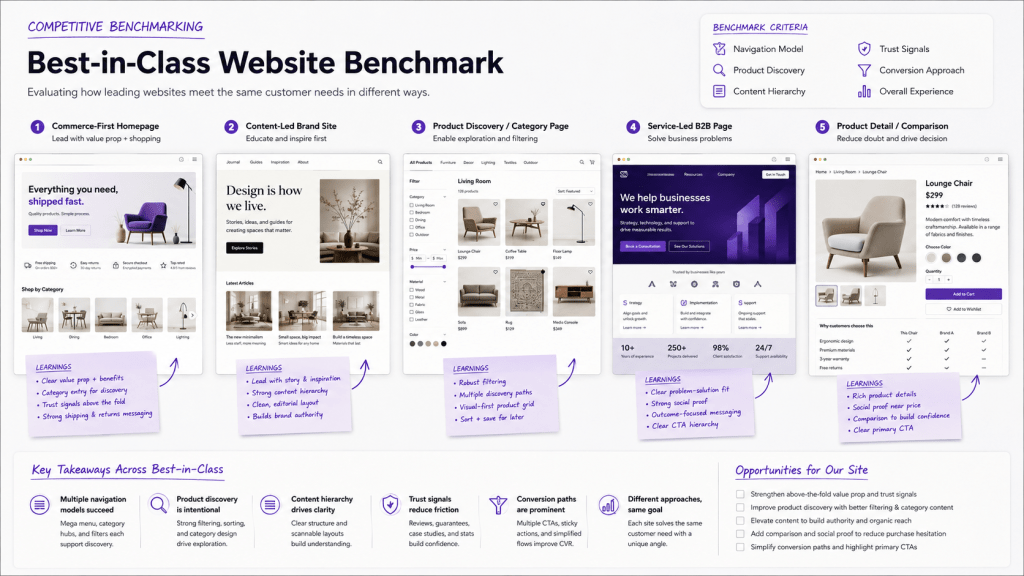
5. Identify competitors and best-in-class experiences
Once the team understands its audiences, customer journeys, goals, and current data, the next useful view is outward.
Start with direct competitors. Look at how they are responding to similar customer needs and how their websites support the same kinds of journeys you are trying to improve. A competitor may be particularly good at explaining a complex product, helping customers compare options, moving people from education into purchase, connecting brand storytelling to commerce, or making a large portfolio easier to navigate.
Then look beyond the direct category. Best-in-class experiences can come from organizations solving a similar customer problem in a different industry. A manufacturer with hundreds of products might learn from a retailer that has created a strong discovery and comparison experience. A healthcare organization might find useful patterns in financial services, where people also need to navigate complex information and make consequential decisions. A B2B technology company might learn from a consumer brand that has made a complicated category easier to understand.
The assessment should connect back to the goals and audiences already defined. If the business wants to become more commerce-led, look for organizations that have successfully created a commerce-first experience. If customers struggle with product selection, study businesses that are particularly good at guiding choice. If the brand needs a stronger digital expression, look at companies that have translated a distinctive brand into the way the entire experience behaves.
The value of the exercise lies in identifying the patterns that appear to be working and the opportunities that are still open.
What you should have at this stage
A set of key learnings from competitors and best-in-class experiences, including the approaches, capabilities, content patterns, navigation models, interactions, and experience ideas that appear to be helping those organizations succeed.
6. Complete a current website audit
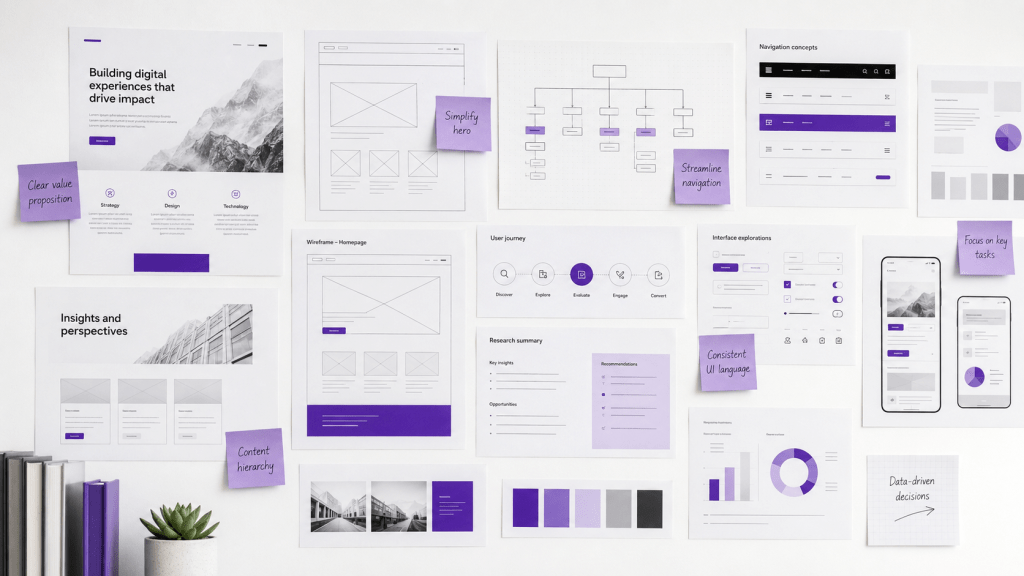
The next step is to look closely at the current website using what you have learned from the business, customers, data, and market.
A website audit should examine the areas that will materially affect the redesign. That can include brand expression, information architecture, navigation, content, UX, conversion, SEO, functionality, accessibility, technology, and the overall consistency of the experience. On a large enterprise website, the audit may also need to consider different business units, languages, regional experiences, legacy platforms, and areas of the site managed by different teams.
The objective is to identify the patterns that matter. The navigation may reflect the company’s internal structure more than the way customers think. Product information may be strong but difficult to discover. Different parts of the site may explain the brand in different ways. Valuable content may exist without a clear path into the buying journey. A commerce experience may perform well at checkout while offering little help earlier in product discovery.
The earlier research gives these observations context. The audit can now compare the current experience with what customers need, what the data is showing, what the brand requires, and what best-in-class organizations are doing well.
What you should have at this stage
A current website audit that identifies the major strengths to preserve, the gaps that need to be addressed, and the opportunities the redesign should pursue.
7. Define the experience vision and principles
With the business goals, brand, audiences, data, market context, and current website understood, the team can define what the new experience should become.
The experience vision should be rooted in the brand. It describes how this particular organization will bring its brand to life digitally while meeting customer needs and supporting the goals of the business. Two organizations can serve similar customers and sell similar products while creating very different experiences because the brands themselves stand for different things.
Experience principles make that vision easier to apply. A complex B2B organization might decide that the experience should make difficult products easier to understand, make evidence easy to find, and allow different audiences to reach relevant information without having to understand the company’s organizational structure. A consumer brand might decide that discovery should feel exploratory, product education should build confidence, and every part of the commerce experience should reinforce the character of the brand.
These principles become a shared reference point as the website takes shape. Content, UX, design, and technology teams can use them to make decisions consistently across different pages and parts of the experience.
What you should have at this stage
A clear experience vision rooted in the brand and a small set of experience principles that can guide content, UX, design, and technology decisions.
8. Define the role of the website
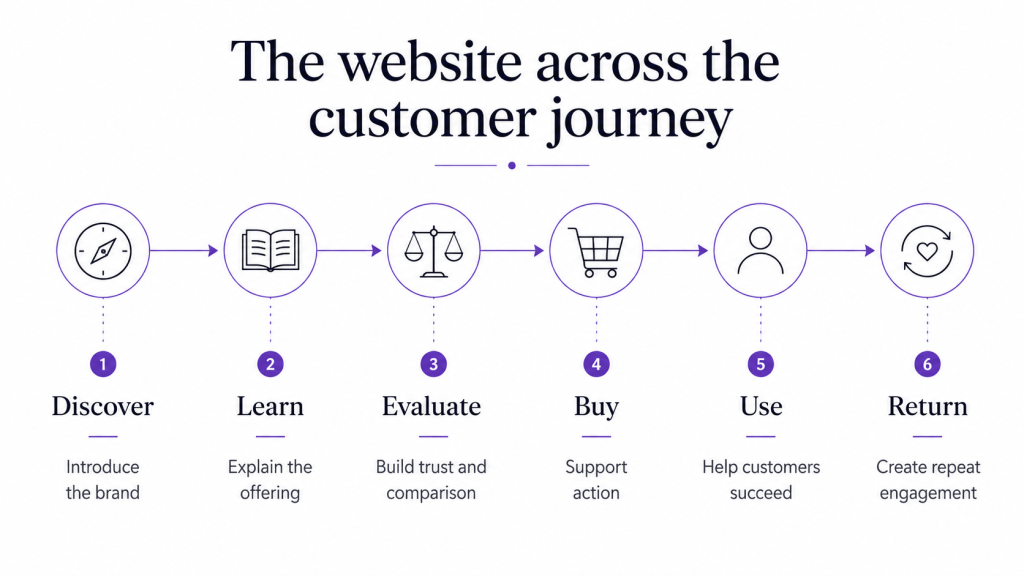
The customer journey provides a practical way to define what the website needs to do.
Imagine a simplified journey that moves through discovery, learning, evaluation, purchase, use, and return. The role of the website can be defined at each stage. During discovery, it may need to introduce the brand or help someone recognize that the company can solve a particular problem. During learning, it may need to explain a category, product, service, or issue. During evaluation, it may need to provide comparison, proof, specifications, case studies, reviews, or expert guidance. At the point of purchase, it may need to support ecommerce, lead generation, a dealer journey, or a sales conversation. Afterward, it may help with service, education, account management, loyalty, or repeat purchase.
The balance will vary by business. A B2B website may be heavily involved in research and evaluation before handing the relationship to sales. A commerce website may own nearly the entire path from discovery through purchase and repeat. An automotive website may combine brand building, model research, configuration, dealer selection, lead generation, and ownership support.
Mapping the website against the customer journey helps the organization see the site as part of a larger experience rather than as a collection of individual pages.
What you should have at this stage
A clear definition of the role the website should play at the important stages of the customer journey and the jobs it needs to perform for both customers and the business.
9. Define the information architecture
Information architecture turns the strategy into a structure people can navigate.
This work defines the sitemap, navigation, hierarchy, taxonomy, and the relationships between different types of information. For a relatively focused website, that may be straightforward. For a large enterprise organization, it can involve hundreds of products, several services, industries, customer groups, business units, markets, brands, and large libraries of educational or support content.
The audience and journey work should guide the structure. If customers shop by need, the website may need a strong path based on needs alongside traditional product categories. If different B2B audiences arrive with different problems, industry, use-case, or solution pathways may be important. If the business operates globally, the architecture may need to account for regional information while preserving a coherent global experience.
Search also matters because many visitors will arrive deep inside the website rather than through the homepage. Someone may land directly on a product page, article, service page, or campaign page through Google, paid media, social media, an AI assistant, or an email. The information architecture should help that person understand where they are and what else is relevant.
What you should have at this stage
A future-state sitemap, navigation model, and taxonomy that organize the website around the needs of customers and the requirements of the business.
10. Define the content strategy
The content strategy defines what information the new website needs, how that information should be structured, and how content will support the brand, customer journeys, and business goals.
The right content system will depend on the business. A commerce website might require product education, buying guidance, product detail content, comparisons, reviews, FAQs, expert advice, recipes, editorial content, and information that helps customers understand which option is right for them. A B2B organization may need product and service information, industry content, case studies, technical documentation, research, proof points, thought leadership, and material that supports both self-directed buyers and sales conversations.
Once the future content strategy is defined, the existing content can be assessed against it. This is where the content audit becomes more useful because there is now a clear future state against which existing pages and assets can be judged. Content can be kept, killed, combined, improved, or newly created based on whether it has a role in the redesigned experience. We cover that process in more detail in How to Run a Website Content Audit So Your Content Actually Does Its Job. Read the website content audit guide
Language and localization also belong in the content strategy. A Canadian organization may need English and French. A global organization may need different languages and market-specific content across regions. Those decisions affect content creation, translation, governance, URLs, and search implementation. Google recommends using distinct URLs for language versions of a page and provides hreflang as a way to signal language or regional variations where appropriate. [4] (Google for Developers)
The content strategy should ultimately make clear what content the new experience requires and how that content will work as a connected system rather than as a series of unrelated pages.
What you should have at this stage
A future-state content strategy, a clear view of the content types and structures the website requires, language and localization requirements where relevant, and a plan for what existing content will be kept, killed, combined, improved, or created.
11. Map the UX and page system
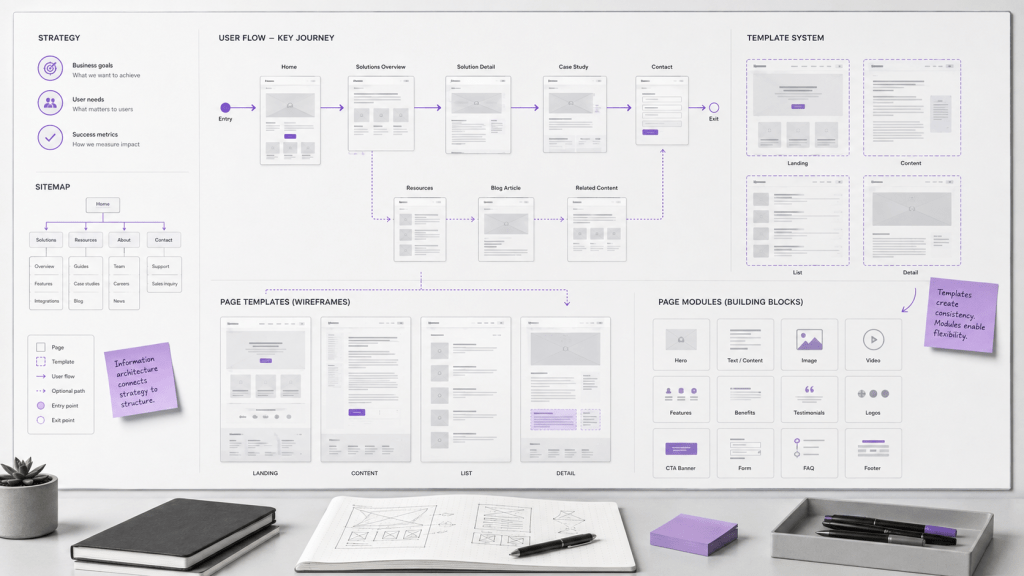
Content strategy and UX often develop in parallel because the two are closely connected. Content defines what customers need to understand, while UX determines how they move through that information and complete the actions that matter.
Start with the priority journeys identified earlier. Map the important flows through the website and the decisions that happen along the way. For a commerce business, that could include moving from a need into a category, comparing products, understanding the differences, choosing the right option, adding it to cart, and completing the purchase. For a B2B website, it could include moving from an industry problem into a relevant solution, reviewing evidence, understanding technical fit, and deciding to contact the company.
From those flows, the team can define the page and template system the website requires. A large site might need homepage, category, product, service, industry, case study, article, resource, campaign, search, profile, location, and support templates. Commerce websites may require additional structures for collections, product variants, comparison, subscriptions, merchandising, reviews, recommendations, and account experiences.
The page system should give teams enough flexibility to support different content and journeys while preserving consistency across the larger experience. This is also where important interactions and conversion flows begin to take a more concrete form.
What you should have at this stage
Mapped priority user journeys and flows, a defined inventory of required page types and templates, and the major interactions needed to support the customer experience.
12. Define functionality and technology requirements
The functionality and technology should support the business strategy, content strategy, and experience that have already been defined.
For a commerce website, the requirements may involve the commerce platform, product information management, search, merchandising, reviews, customer accounts, subscriptions, CRM, loyalty, analytics, and integrations with other parts of the marketing and retail ecosystem. A B2B website may depend more heavily on the CMS, CRM, marketing automation, lead routing, personalization, product databases, account-based marketing platforms, gated content, or integrations with sales systems.
The CMS is particularly important because it becomes part of the way the organization operates the website. The team needs to understand whether it can support the content structures, languages, workflows, permissions, integrations, reusable components, publishing needs, and pace of change the strategy requires.
Enterprise organizations may also have technical requirements that are already established. Security, infrastructure, procurement standards, existing platforms, data architecture, accessibility requirements, and global technology policies can all influence the solution.
At this stage, the objective is to create enough technical clarity for the experience and technology teams to work from the same set of requirements.
What you should have at this stage
A clear set of functional and technology requirements aligned to the business strategy, customer experience, content strategy, and the broader marketing and technology stack.
13. Decide how the design system will be handled
A website redesign also needs a decision about the design system that will support the experience.
Some organizations already have a mature digital design system with established components, interaction patterns, accessibility standards, and documentation. Others have a visual brand system but relatively little guidance for digital products. Some have accumulated components across several years of website development and need the redesign to bring greater consistency to the system.
The team should decide what the new website will inherit and what needs to change. An existing system may be strong enough to use as it is. It may need to be extended with new components or patterns. In other cases, the redesign may become the point at which a new digital design system is created.
This decision has practical implications for design, development, content production, QA, and future website operations. A well-structured system gives teams a shared set of building blocks and makes it easier to extend the experience without redesigning common patterns each time a new need appears.
What you should have at this stage
A clear design-system approach that defines what will be reused, what needs to evolve, and whether a new digital design system needs to be created as part of the redesign.
14. Establish website ownership, governance, and design operations
A large redesign needs an operating model for the project itself and another for the website that will exist after launch.
During the redesign, the team should define who is involved in the major decisions and how those decisions move through the organization. Brand, marketing, ecommerce, content, UX, design, technology, legal, product, regional teams, and business leadership may all need to participate at different points. The approval process should make clear who provides input, who owns each area, and who makes the final decision when several stakeholders are involved.
The same thinking needs to continue after launch. Someone needs to own the website as an experience. Content needs clear ownership and publishing processes. The design system needs to be maintained. Analytics need to be reviewed. New page and feature requests need a process. Regional or business-unit teams may need a defined level of autonomy within a broader set of standards.
Design operations can help make that model work at scale. Shared workflows, reusable systems, documentation, templates, clear handoffs, and consistent approval processes can make website teams faster while preserving quality. AI-enabled design operations can increasingly support parts of this work as well, including first-pass content production, localization workflows, documentation, quality checks, component usage, requirements organization, and other repeatable production tasks. The important decision is where those tools fit into the operating model and who remains responsible for review and approval.
For enterprise organizations, these questions have a direct effect on what the website becomes over time. The launch creates a new starting point, but the operating model determines how consistently the experience can evolve after that point.
What you should have at this stage
A clear governance and operating model for both the redesign and the live website, including decision rights, approval workflows, content and publishing ownership, design operations, technology ownership, and responsibility for ongoing improvement.
15. Plan measurement, migration, and launch requirements
The final part of the website redesign checklist connects the strategy to implementation and launch.
The KPIs were defined at the beginning of the project. This stage determines how those KPIs will actually be measured. That can include the GA4 setup, Google Tag Manager, ecommerce tracking, CRM attribution, key events, dashboards, and any custom measurement required by the website. Google Analytics uses events to measure specific interactions, including actions such as purchases, searches, lead generation, signups, and other website behaviours, which makes the event plan an important bridge between the digital goals and the analytics implementation. [2] (Google Help)
Migration planning protects the value already built into the existing website. Content needs to be moved into the new structures, URLs need to be accounted for, and pages with existing search value need particular attention. Where URLs change, Google recommends mapping old URLs to their appropriate new destinations and implementing redirects as part of the site move. [5] (Google for Developers)
The launch plan should also cover the work needed to make sure the experience performs as intended. That can include functional QA, content QA, analytics validation, accessibility testing, browser and device testing, SEO checks, stakeholder review, CMS training, documentation, and clear responsibilities for launch and post-launch monitoring.
For a large website, these activities should be planned before the final weeks of the project because they often involve different teams and dependencies. The redesign is ready to launch when the experience, content, technology, measurement, and operating model are all prepared to move together.
What you should have at this stage
A measurement implementation plan, content and SEO migration plan, QA and accessibility requirements, training and documentation needs, and a clear launch and post-launch responsibility model.
Frequently asked questions
What should be included in a website redesign checklist?
A website redesign checklist should cover the decisions that shape the future experience as well as the requirements needed to build and launch it. For a mid-market or enterprise organization, that includes business and digital goals, brand positioning, audiences and customer journeys, analytics, best-in-class research, the current website, experience strategy, information architecture, content strategy, UX, technology, the design system, governance, measurement, migration, and launch planning.
The level of detail will vary by organization. A B2B company with a focused offering may have fewer content and commerce requirements than a global consumer organization with multiple product lines, regions, languages, and customer groups, but the underlying areas of the checklist remain similar.
What should you do before redesigning a website?
Start by establishing what the business needs the website to accomplish and how success will be measured. Make sure the brand positioning and messaging are clear, identify the priority audiences, map their customer or buying journeys, review existing website and customer data, and study competitors and best-in-class experiences.
Those inputs provide the foundation for defining the future experience, the role of the website, information architecture, content strategy, UX, technology, and operating model.
How do you plan an enterprise website redesign?
An enterprise website redesign needs to account for both the customer experience and the organizational complexity behind it. The planning process should identify the business goals, brands, audiences, customer journeys, regions, languages, content estate, technology systems, stakeholders, and governance requirements that will shape the website.
From there, the team can establish an experience vision, define how the website supports the customer journey, create the information and content structures, map the UX, determine technology requirements, and establish how the organization will build and operate the experience.
Does this website redesign process apply to B2B, B2C, and commerce websites?
Yes. The structure of the work remains useful across all three, although the emphasis changes.
A B2B redesign may place more weight on long buying journeys, product or solution education, technical information, customer evidence, CRM, and lead generation. A B2C website may place more weight on brand experience, content, customer service, and a broader mix of customer needs. Commerce adds product discovery, merchandising, product information, comparison, transactions, accounts, loyalty, and repeat purchase.
The common requirement is to connect the website to the way customers actually move through the relationship with the business.
How do you redesign a website without losing SEO?
SEO migration begins with understanding the value of the existing website before URLs, content, and architecture change. Search Console can show which queries and pages are currently generating search visibility and clicks, giving the team a clearer picture of what needs to be protected. [3] (Google Help)
As the new architecture is developed, existing URLs should be mapped to the most appropriate new destinations. Where URLs change, permanent redirects should be planned and tested, important content and internal linking should be accounted for, and search performance should be monitored after launch. Google provides specific guidance for site moves involving URL changes. [5] (Google for Developers)
Is a website redesign the same as a website replatform?
They can be part of the same program, but they describe different changes.
A website redesign changes the experience. That can include the strategy, information architecture, content, UX, visual design, conversion flows, and functionality. A replatform changes the underlying technology, such as moving from one CMS or commerce platform to another.
Many enterprise projects combine the two because an existing platform no longer supports the future experience, content model, integration requirements, or operating needs. Other organizations can redesign successfully while keeping the existing platform.
How long does an enterprise website redesign take?
The timeline depends on the size of the website, the number of audiences and stakeholders, the amount of content, the technology involved, the number of markets and languages, and whether the project includes a replatform or significant system integration.
The more useful planning question is what work needs to be completed before each stage can move forward with confidence. A relatively focused redesign can progress quickly when the brand, content, technology, and decision-making structures are already clear. A large global redesign may require more discovery and definition because the website has to bring together a much larger set of organizational and customer requirements.
Sources
1. New Brains
New Brains proprietary client knowledge and practitioner experience. The framework in this article draws on website strategy, ecommerce, content, UX, digital experience, and transformation work across large B2B, B2C, commerce, healthcare, automotive, technology, and nonprofit environments, including work on Mazda Canada, The Ottawa Hospital, UNICEF, and Jabil. It also reflects senior agency experience developed through roles at Publicis and VML within the WPP network. New Brains describes its broader website strategy approach as connecting business strategy, customer needs, content, experience, and technology. (NEWBRAINS)
2. Google Analytics
Google Analytics documentation on events and recommended events. GA4 uses events to measure interactions and provides recommended event structures for areas including ecommerce and lead generation. (Google Help)
3. Google Search Console
Search Console Performance Report documentation. The report provides search performance data including clicks, impressions, queries, pages, click-through rate, and other dimensions that can help establish the existing search baseline before a redesign. (Google Help)
4. Google Search Central
Managing Multi-Regional and Multilingual Sites. Google guidance covering separate URLs for language versions and the use of hreflang for language and regional variations. (Google for Developers)
5. Google Search Central
Site Moves and Migrations. Google guidance covering URL mapping, redirects, testing, and other considerations when a website changes URLs during migration. (Google for Developers)

