
A practical way to find where AI can genuinely save time, what needs fixing first, and where people should stay in control.
Summary
Before adding AI to a content workflow, teams should first understand how the work gets done today. A content workflow audit maps how content moves from request and research through creation, review, approval, publishing, and maintenance, then looks for friction, duplication, unclear ownership, and opportunities for AI.
The goal isn’t to AI all the things. It’s to find the places where it can remove work without creating more review, cleanup, or complexity somewhere else. Because who has the time?
What is a content workflow audit?
A content workflow audit looks at how content gets made, not just at the content itself, which makes it different from a traditional content audit.
A content audit asks questions like:
- Is this content still useful?
- Is it accurate and up to date?
- Should we keep it, update it, combine it, or remove it?
A content workflow audit looks at the process around that content:
- How did the request come in?
- Where did the information come from?
- Who created, reviewed, and approved it?
- Who published it?
- Once it’s live, who owns keeping it up to date?
At NewBrains, Max Abuyuan and the team looks at AI readiness as an operations question before it becomes a technology solution. If a team doesn’t really understand how content gets from request to publish today, adding AI somewhere in the middle isn’t automatically going to make the process better. It may just help a confusing process move faster.
Why audit your content workflow before adding AI?
A content workflow audit helps you figure out where AI can actually help, and what needs fixing first. It can show you where work gets repeated, approvals drag, information is hard to find, or people are doing the same manual tasks over and over.
For example, if writers spend hours turning the same approved information into different formats, AI may save time. But if three teams are working from different versions of the same product information, generating content faster won’t fix the real problem. The information itself needs to be sorted out first.
Large companies are dealing with the same thing at a much bigger scale. Best Buy, for example, has been connecting its content systems, workflows, metadata, approvals, and rules so teams can find and reuse approved content more easily while using AI for more repetitive production work.
For smaller teams, the takeaway is simple: look for the problem before you look for the AI use case. Some parts of the process are worth automating. Others just need to be simpler.
How do you map a content workflow?
Start by tracing how content moves from the initial request through publishing and maintenance. For each step, capture what happens today, who owns it, which tools are already being used, what causes friction, and where AI might help.Start by tracing how content moves from the initial request through publishing and maintenance. For each step, capture what happens today, who owns it, which tools are already being used, what causes friction, and where AI might help.
A simple spreadsheet is enough. NewBrains uses a Content Workflow + AI Opportunity Audit to make the process visible and help teams spot where the real opportunities are.
Use our FREE sample Content Workflow + AI Opportunity Audit template to map your own process.
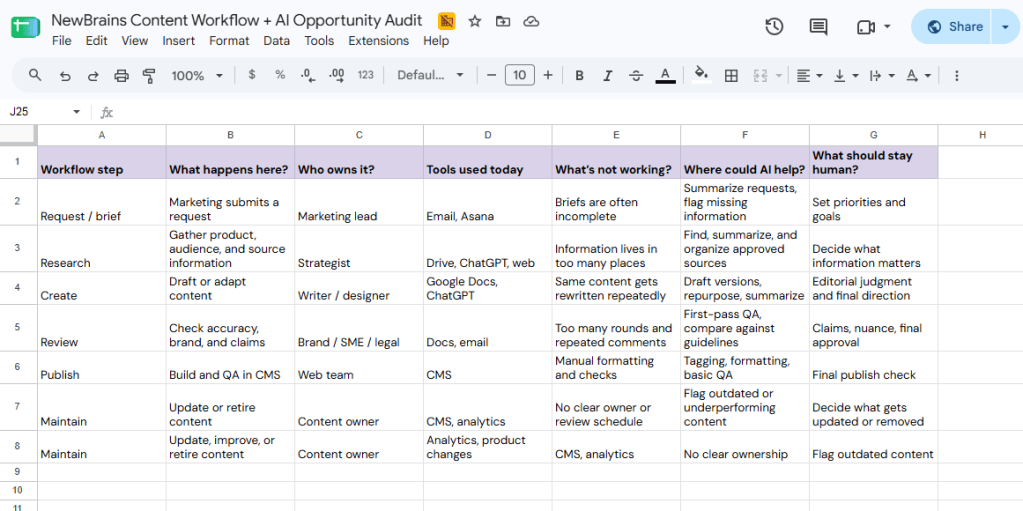
A simple spreadsheet is enough. NewBrains uses a Content Workflow + AI Opportunity Audit to make the process visible and help teams identify where the real opportunities are.
A basic workflow might look like:
Request → brief → research → create → review → approve → publish → measure → update or retire
For each step, capture:
- What happens here? What work is actually being done?
- Who owns it? Who is responsible for moving it forward?
- What tools are used today? Include CMSs, project-management tools, spreadsheets, ChatGPT, Copilot, Claude, and anything else people are already using.
- What’s not working? Where does work get delayed, repeated, lost, or made harder than it needs to be?
- Where could AI help? Look for repetitive work, summarizing, repurposing, first-pass checks, tagging, or information retrieval.
- What should stay human? Strategy, judgment, sensitive claims, brand decisions, and final accountability.
The point isn’t to turn every problem into an AI use case. Sometimes the best finding is that the team needs a clearer brief, fewer approvals, better source information, or clearer ownership first.
Once the workflow is laid out, the opportunities become much easier to see. You can tell where AI is already being used, where it could save time, and where adding it would probably just create more work.
What content tasks are best suited to AI?
AI is most useful for content tasks that are repetitive, time-AI is most useful for content tasks that are repetitive, take a lot of time, and follow clear rules or use clear source material. These are usually the easiest places to save time without creating a lot of extra review.
That might include:
- summarizing research or source material
- turning approved content into different formats
- creating first drafts or variations
- comparing versions
- checking content against brand or formatting rules
- tagging or organizing content
- flagging missing information
- spotting outdated content
- handling repetitive quality checks
It also helps to separate AI assistance from AI automation. AI assistance means a person is still doing the work, but AI helps with part of it. AI automation means part of the task happens with less direct human involvement.
For example. asking AI to create five headline options is very different from letting it publish a product claim without review.
A good place to start is with tasks that are repetitive and easy to check. Keep people closely involved when the work affects strategy, brand decisions, sensitive claims, or important business choices.
Best Buy uses AI for high-volume production work like adapting assets, tagging, and search, while people still refine the final creative and teams across legal, creative, metadata, and compliance help define the rules around how AI is used.
For smaller teams, the advice is straightforward: use AI first where it can save time without giving up the checks that matter.
What should be fixed before adding AI?
Fix the parts of the workflow that are already causing confusion, delays, or rework. AI can help with a lot of tasks, but it won’t solve unclear ownership, bad source information, too many approvals, or content that no one maintains.
Common problems to look for include:
- people working from different versions of the same information
- briefs that are incomplete or inconsistent
- too many review and approval steps
- unclear ownership
- duplicate work across teams
- scattered brand or product guidance
- content that goes live and is never reviewed again
Zapier’s marketing team uses ChatGPT Work for things like lead-funnel QA, campaign assets, and reporting. That’s a useful reminder that AI doesn’t have to take over the whole process to be valuable. It can be added to specific parts of the workflow where the work is repetitive and time-consuming.
For smaller teams, the takeaway is simple: fix the workflow problems AI would otherwise inherit. Sometimes the best result from an audit is realizing you don’t need another AI tool yet. You need a clearer brief, one reliable source of information, fewer approvals, or someone who actually owns the content after it goes live.
How do you know if AI is actually saving time?
Look at what changed in the workflow, not how much AI-generated content the team produced. If AI is working, you should be able to see less time spent on repetitive work, fewer revisions, faster publishing, or less effort maintaining content.
Useful things to track include:
- time from request to publish
- number of review or revision rounds
- time spent on repetitive tasks
- errors or corrections after publishing
- how often approved content gets reused
- how much time people spend finding information
- how much content needs to be reworked
- whether the content is actually performing better
The important part is to compare the workflow before and after AI is introduced. If a team can produce drafts twice as fast but now spends more time checking, correcting, and managing them, the technology may not be saving much work at all.
For NewBrains, this is another reason to start with the workflow audit. You need a clear picture of how the work happens today before you can tell whether AI actually improved it.
What changes when AI starts working for your customers too?
AI is starting to do more than help internal teams create content. It is also beginning to search, compare, recommend, and act on behalf of customers. That means the information companies manage may increasingly need to work for both people and machines.
For content and digital teams, that puts more pressure on things like:
- clear product information
- structured content
- accurate pricing and availability
- useful metadata
- consistent policies
- reliable source information
If an AI agent is trying to compare products or answer a customer’s question, it needs information it can actually understand and trust.
That makes good content operations even more important. The work is no longer only about helping people find and use information on a website. It is also about making sure that information can be found, understood, and used by the systems acting on their behalf.
For NewBrains, this is where content operations, website operations, and AI readiness start to overlap. Teams that get the basics right now will be in a much better position as agentic experiences become more common.
Where should you start?
Start by understanding the workflow you already have. Map how content gets requested, created, reviewed, published, and maintained. Then look at where work gets repeated, where information is hard to find, where approvals slow things down, and where AI could realistically save time.
You don’t need a big AI transformation plan to begin. A simple workflow audit can show you where the real opportunities are, and just as importantly, where the problem is the process itself.
At NewBrains, we use this kind of approach to help teams understand how their content operation works today, where AI can fit, and what needs to change first. Because the goal isn’t to add AI everywhere, just because. It’s to make the work better, simpler, and easier to manage.
Sources
- Adobe, Best Buy Connects AI, Governance, and Content at a Massive Scale
- OpenAI, How Zapier Transformed Core Marketing Processes With ChatGPT Work
- OpenAI, Agentic Commerce Protocol
- NewBrains, proprietary website strategy and content frameworks

